


 NuGet
NuGet
Common events
Editor events let your application react when content changes or users paste, select text, switch modes or open a context menu. Handle these events to save changes, update your interface or customize the editing workflow. This guide covers the five common hooks: HtmlChanged, Pasting, SelectionChanged, EditorModeChanged and ContextMenuShowing.
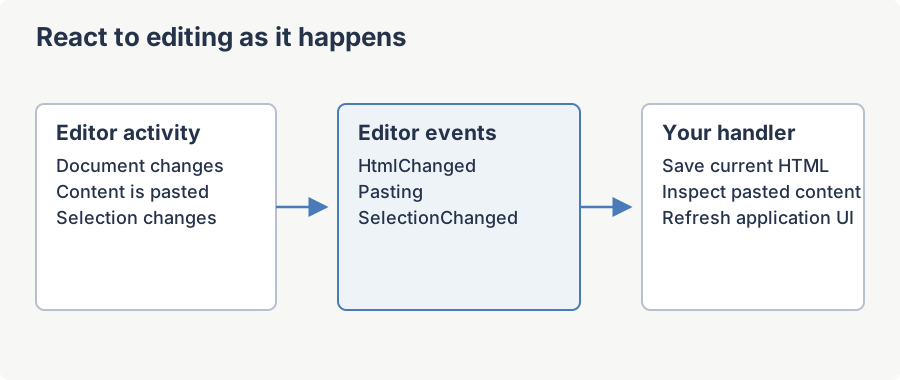
All five events are declared on the partial class WinFormHtmlEditor in the namespace SpiceLogic.HtmlEditor.WinForms. They use the standard .NET delegate shape EventHandler<TEventArgs>, so they are subscribable both from code and from the Visual Studio designer's property grid. In every example, htmlEditor1 is an instance dropped onto a WinForms designer.
HtmlChanged Event
Fires whenever the HTML of the whole document changes. Even when only the <head> element changes, this event fires. This is the primary signal customers use to drive an "is dirty?" indicator, an autosave timer, or a live preview pane.
Syntax
public event EventHandler<EventArgs> HtmlChanged;Public Event HtmlChanged As EventHandler(Of EventArgs)Event data
The handler receives a plain System.EventArgs -- no payload. To read the new content, call Content.GetDocumentHtml() or Content.GetBodyHtml(false) on the editor instance.
Remarks
The event fires on the UI thread. Reading the document HTML inside the handler is safe but not free -- in WYSIWYG mode the editor walks the MSHTML DOM to serialize the document. For very long documents, debounce your handler (for example, restart a System.Windows.Forms.Timer and do the work on its Tick) rather than re-serializing on every keystroke.
Example
// Drive an "is dirty?" flag and an autosave timer from HtmlChanged.

htmlEditor1.HtmlChanged += OnHtmlChanged;


private bool _isDirty;

private void OnHtmlChanged(object sender, EventArgs e)

{

    _isDirty = true;

    saveButton.Enabled = true;

    statusLabel.Text = "Modified";

    autosaveTimer.Stop();

    autosaveTimer.Start(); // debounce: restart on every change

}
Pasting Event
Raised when the user pastes content into the document (Ctrl+V, the Paste toolbar button, the Paste-from-Word toolbar button, or the context-menu Paste command). The handler can inspect the HTML the editor is about to insert, rewrite it, or cancel the paste entirely. This is the right hook for enforcing a corporate style guide, stripping unwanted markup, or blocking certain content types.
Syntax
public event EventHandler<PastingHtmlEventArgs> Pasting;Public Event Pasting As EventHandler(Of PastingHtmlEventArgs)Event data
Members of PastingHtmlEventArgs (also implements IPastingHtmlEventArgs):
| Member | Type | Description |
|---|---|---|
| e.PastingHtml | string (get/set) | The HTML the editor is about to insert. Assigning a different value replaces what gets inserted and flips IsModified to true. May be null when Options.MsIePasteBehavior is true -- in that mode the underlying browser handles the paste and the editor never sees the HTML. |
| e.Cancel | bool (get/set) | Set to true to abort the paste. Default false. |
| e.IsModified | bool (get) | Read-only flag the editor uses to know whether the handler changed PastingHtml. Set automatically when the property is assigned a different value. |
| e.IsPastingFromMsWord | bool (get) | true when the clipboard content was identified as MS Word output, or when the user clicked the legacy Paste from Word toolbar button. |
Remarks
For images on the clipboard, PastingHtml arrives pre-encoded according to Options.PasteImageFromClipboardBehavior (Base64 data URL, file in BaseUrl, or empty when None). For plain text the editor wraps the text in HTML via TextToHtmlConverter before raising the event.
Example
// Strip inline font styling and reject <script> before the paste lands.
htmlEditor1.Pasting += OnPasting;

private void OnPasting(object sender, PastingHtmlEventArgs e)
{
    if (string.IsNullOrEmpty(e.PastingHtml))
        return;
    // Let the page CSS win by removing inline font-family / font-size.
    e.PastingHtml = Regex.Replace(e.PastingHtml, @"(?<![-\w])(?:font-family|font-size)\s*:\s*(?:[^;'"<>{}]|"[^"';<>{}]*"|'[^'";<>{}]*')*;?", string.Empty, RegexOptions.IgnoreCase);
    // Block smuggled scripts outright.
    if (e.PastingHtml.IndexOf("<script", StringComparison.OrdinalIgnoreCase) >= 0)
        e.Cancel = true;
}
SelectionChanged Event
Occurs when the current selection has changed. This is the event customers wire to refresh a custom property panel ("currently selected element is a TABLE"), or to enable/disable application-level commands that depend on what the user has highlighted.
Syntax
public event EventHandler<EventArgs> SelectionChanged;Public Event SelectionChanged As EventHandler(Of EventArgs)Event data
Plain System.EventArgs. To inspect what is currently selected, use:
StateQuery.GetActiveHtmlElement()-- the MSHTML element under the caret.Selection.GetSelectedHtml()-- the HTML of the highlighted range.Selection.GetSelectionLength()/Caret.GetCaretIndex()-- numeric position info.
Remarks
The event fires from the MSHTML onselectionchange DOM event, so it fires on every caret movement (arrow keys, mouse clicks) -- not only when a non-empty range is selected. Keep the handler cheap. The related events SelectionStart (drag-out start) and SelectingElement (block-level control selection) share the same delegate shape.
Example
// Show a table-editing toolstrip only while the caret is inside a <TABLE>.
htmlEditor1.SelectionChanged += OnSelectionChanged;

private void OnSelectionChanged(object sender, EventArgs e)
{
    var el = htmlEditor1.StateQuery.GetActiveHtmlElement();
    tableToolStrip.Visible = el != null && string.Equals(el.tagName, "TABLE", StringComparison.OrdinalIgnoreCase);
    selectionLengthLabel.Text = "Selected chars: " + htmlEditor1.Selection.GetSelectionLength();
}
EditorModeChanged Event
Occurs when the editor switches between WYSIWYG, HTML source, and preview modes. The three modes are exposed by the EditorMode property of type EditorModes:
WysiwygDesign-- the user edits visually using the formatting toolbar.HtmlEdit-- the user edits raw HTML in the source TextBox.ReadOnlyPreview-- the user views the content as a browser would render it.
Syntax
public event EventHandler<EventArgs> EditorModeChanged;Public Event EditorModeChanged As EventHandler(Of EventArgs)Event data
Plain System.EventArgs. Read the current mode from htmlEditor1.EditorMode.
Remarks
Use this event to keep your own UI in sync with the editor mode -- for example, hiding a "format painter" button while the user is in source-view mode where formatting commands do not apply.
Example
// Mirror the editor's mode in the surrounding UI.
htmlEditor1.EditorModeChanged += OnEditorModeChanged;

private void OnEditorModeChanged(object sender, EventArgs e)
{
    bool isDesign = htmlEditor1.EditorMode == EditorModes.WysiwygDesign;
    formatPainterButton.Enabled = isDesign;
    sourceViewLabel.Visible = htmlEditor1.EditorMode == EditorModes.HtmlEdit;
    previewBanner.Visible = htmlEditor1.EditorMode == EditorModes.ReadOnlyPreview;
}
ContextMenuShowing Event
Fires when the user right-clicks in the editor client area, just before the built-in context menu would otherwise open. Use this event to display your own context menu instead of the built-in one, or to inject extra menu items at the cursor location.
Syntax
public event EventHandler<ContextMenuShowingEventArgs> ContextMenuShowing;Public Event ContextMenuShowing As EventHandler(Of ContextMenuShowingEventArgs)Event data
Members of ContextMenuShowingEventArgs:
| Member | Type | Description |
|---|---|---|
| e.OffsetMousePosition | System.Drawing.Point (get) | The mouse cursor position relative to the editor client area at the time of the right-click. Use this to position your own ContextMenuStrip. |
Remarks
If you want to suppress the right-click menu entirely without replacing it, set Options.DisableEditorRightClick = true -- the event will not fire in that case. To replace the default menu but keep its appearance, assign your own ContextMenuStrip to the editor's EditorContextMenuStrip property; subscribing to this event is then only needed when you want to show a one-off menu based on what was clicked.
Example
// Pop a custom ContextMenuStrip at the click point.
htmlEditor1.ContextMenuShowing += OnContextMenuShowing;

private void OnContextMenuShowing(object sender, ContextMenuShowingEventArgs e)
{
    Point screenPos = htmlEditor1.PointToScreen(e.OffsetMousePosition);
    myCustomContextMenu.Show(screenPos);
}
See also: Other Useful Events - documents the remaining events on WinFormHtmlEditor that are useful but less frequently subscribed.
Ask your AI to do this
Connect the SpiceLogic MCP server, then give your coding assistant this prompt.
I use the SpiceLogic WinForms HTML Editor. Help me handle document, selection and mode changes in my application. Confirm the exact API names, types and defaults with the SpiceLogic MCP documentation, then show the changes for my project.